face.iot

 |
|  140 |
140 |  0 |
0 |  0
0


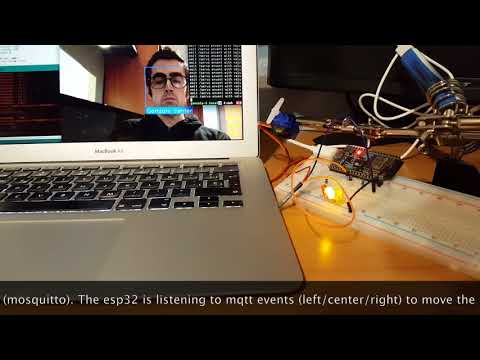
One saturday morning I was having a breakfast and I discovered face_recognition project (https://github.com/ageitgey/face_recognition). I started to play with the opencv example. I put my picture and, Wow! ! it works like a charm. It's pretty straightforward to detect my face and also I can obtain face landmarks. One of the landmark that I can obtain is the nose tip. Playing with this script I realized that with the nose tip I can figure out the position of the face. As well as I have a new iot device (one ESP32) I wanted to do something with it. For example control a servo (SG90) and move it from left to right depending on my face position.
First we have the main python script. With this script I detect my face, the nose tip and the position of my face. With this position I will emit an event to a mqtt broker (a mosquitto server running on my laptop).
import face_recognitionimport cv2import numpy as npimport mathimport paho.mqtt.client as mqtt

video_capture = cv2.VideoCapture(0)

gonzalo_image = face_recognition.load_image_file("gonzalo.png")
gonzalo_face_encoding = face_recognition.face_encodings(gonzalo_image)[0]

known_face_encodings = [
    gonzalo_face_encoding
]
known_face_names = [    "Gonzalo"]RED = (0, 0, 255)GREEN = (0, 255, 0)BLUE = (255, 0, 0)

face_locations = []
face_encodings = []
face_names = []
process_this_frame = Truestatus = ''labelColor = GREENclient = mqtt.Client()
client.connect("localhost", 1883, 60)while True:
    ret, frame = video_capture.read()    # Resize frame of video to 1/4 size for faster face recognition processing
    small_frame = cv2.resize(frame, (0, 0), fx=0.25, fy=0.25)    # Convert the image from BGR color (which OpenCV uses) to RGB color (which face_recognition uses)
    rgb_small_frame = small_frame[:, :, ::-1]

    face_locations = face_recognition.face_locations(rgb_small_frame)
    face_encodings = face_recognition.face_encodings(rgb_small_frame, face_locations)
    face_landmarks_list = face_recognition.face_landmarks(rgb_small_frame, face_locations)

    face_names = []    for face_encoding, face_landmarks in zip(face_encodings, face_landmarks_list):
        matches = face_recognition.compare_faces(known_face_encodings, face_encoding)
        name = "Unknown"

        if True in matches:
            first_match_index = matches.index(True)
            name = known_face_names[first_match_index]

            nose_tip = face_landmarks['nose_tip']
            maxLandmark = max(nose_tip)
            minLandmark = min(nose_tip)

            diff = math.fabs(maxLandmark[1] - minLandmark[1])            if diff < 2:
                status = "center"
                labelColor = BLUE
                client.publish("/face/{}/center".format(name), "1")            elif maxLandmark[1] > minLandmark[1]:
                status = ">>>>"
                labelColor = RED
                client.publish("/face/{}/left".format(name), "1")            else:
                status = "<<<<"
                client.publish("/face/{}/right".format(name), "1")
                labelColor = RED

            shape = np.array(face_landmarks['nose_bridge'], np.int32)
            cv2.polylines(frame, [shape.reshape((-1, 1, 2)) * 4], True, (0, 255, 255))
            cv2.fillPoly(frame, [shape.reshape((-1, 1, 2)) * 4], GREEN)

        face_names.append("{} {}".format(name, status))    for (top, right, bottom, left), name in zip(face_locations, face_names):        # Scale back up face locations since the frame we detected in was scaled to 1/4 size
        top *= 4
        right *= 4
        bottom *= 4
        left *= 4

        if 'Unknown' not in name.split(' '):
            cv2.rectangle(frame, (left, top), (right, bottom), labelColor, 2)
            cv2.rectangle(frame, (left, bottom - 35), (right, bottom), labelColor, cv2.FILLED)
            cv2.putText(frame, name, (left + 6, bottom - 6), cv2.FONT_HERSHEY_DUPLEX, 1.0, (255, 255, 255), 1)        else:
            cv2.rectangle(frame, (left, top), (right, bottom), BLUE, 2)

    cv2.imshow('Video', frame)    if cv2.waitKey(1) & 0xFF == ord('q'):        breakvideo_capture.release()
cv2.destroyAllWindows()
Now another Python script will be listening to mqtt events and it will trigger one event with the position of the servo.
import paho.mqtt.client as mqttclass Iot:
    _state = None
    _client = None
    _dict = {        'left': 0,        'center': 1,        'right': 2
    }    def __init__(self, client):        self._client = client    def emit(self, name, event):        if event != self._state:            self._state = event            self._client.publish("/servo", self._dict[event])            print("emit /servo envent with value {} - {}".format(self._dict[event], name))def on_message(topic, iot):
    data = topic.split("/")
    name = data[2]
    action = data[3]
    iot.emit(name, action)


client = mqtt.Client()
iot = Iot(client)

client.on_connect = lambda self, mosq, obj, rc: self.subscribe("/face/#")
client.on_message = lambda client, userdata, msg: on_message(msg.topic, iot)

client.connect("localhost", 1883, 60)
client.loop_forever()
And finally the ESP32. Here will connect to my wifi and to my mqtt broker.
#include <WiFi.h>#include <PubSubClient.h>#define LED0 17#define LED1 18#define LED2 19#define SERVO_PIN 5// wifi configurationconst char* ssid = "my_ssid";const char* password = "my_wifi_password";// mqtt configurationconst char* server = "192.168.1.111"; // mqtt broker ipconst char* topic = "/servo";const char* clientName = "com.gonzalo123.esp32";int channel = 1;int hz = 50;int depth = 16;

WiFiClient wifiClient;
PubSubClient client(wifiClient);void wifiConnect() {
  Serial.print("Connecting to ");
  Serial.println(ssid);

  WiFi.begin(ssid, password);  while (WiFi.status() != WL_CONNECTED) {    delay(500);
    Serial.print("*");
  }

  Serial.print("WiFi connected: ");
  Serial.println(WiFi.localIP());
}void mqttReConnect() {  while (!client.connected()) {
    Serial.print("Attempting MQTT connection...");    if (client.connect(clientName)) {
      Serial.println("connected");
      client.subscribe(topic);
    } else {
      Serial.print("failed, rc=");
      Serial.print(client.state());
      Serial.println(" try again in 5 seconds");      delay(5000);
    }
  }
}void callback(char* topic, byte* payload, unsigned int length) {
  Serial.print("Message arrived [");
  Serial.print(topic);

  String data;  for (int i = 0; i < length; i++) {
    data += (char)payload[i];
  }  int value = data.toInt();  cleanLeds();  switch (value)  {    case 0:      ledcWrite(1, 3400);      digitalWrite(LED0, HIGH);      break;    case 1:      ledcWrite(1, 4900);      digitalWrite(LED1, HIGH);      break;    case 2:      ledcWrite(1, 6400);      digitalWrite(LED2, HIGH);      break;
  }
  Serial.print("] value:");
  Serial.println((int) value);
}void cleanLeds() {  digitalWrite(LED0, LOW);  digitalWrite(LED1, LOW);  digitalWrite(LED2, LOW);
}void setup() {
  Serial.begin(115200);  ledcSetup(channel, hz, depth);  ledcAttachPin(SERVO_PIN, channel);  pinMode(LED0, OUTPUT);  pinMode(LED1, OUTPUT);  pinMode(LED2, OUTPUT);  cleanLeds();  wifiConnect();
  client.setServer(server, 1883);
  client.setCallback(callback);  delay(1500);
}void loop()
{  if (!client.connected()) {    mqttReConnect();
  }

  client.loop();  delay(100);
}
Here a video with the working prototype in action
还没有评论,说两句吧!
热门资源

allennlp-server
allennlp-server Serve allennlp services as sep...

DuReader_QANet_BiDAF
Machine Reading Comprehension on DuReader Usin...

ETD_cataloguing_a...
ETD catalouging project using allennlp

ubuntu-allennlp
ubuntu-allennlp AllenAI AllenNLP image based o...

allennlp_extras
allennlp_extras Some utilities build on top of...


智能在线
400-630-6780

聆听.建议反馈
E-mail: support@tusaishared.com



 资源分类
资源分类